
Welcome to the Labs sessions with Nav! We love to make and share projects with our community and enjoy nothing more than providing you with FREE monthly CNC projects that you can download and cut for yourself!
Each project comes with its own video for you to watch telling the story of what we’re making from start to finish. It includes technical software footage, machining each part in the Labs and finishing the project, and as an added bonus, we throw in a few tips based on our experience! We would love to see what you turned this project into so download the files from your V&CO account then share what you’ve made on the Vectric Forum.
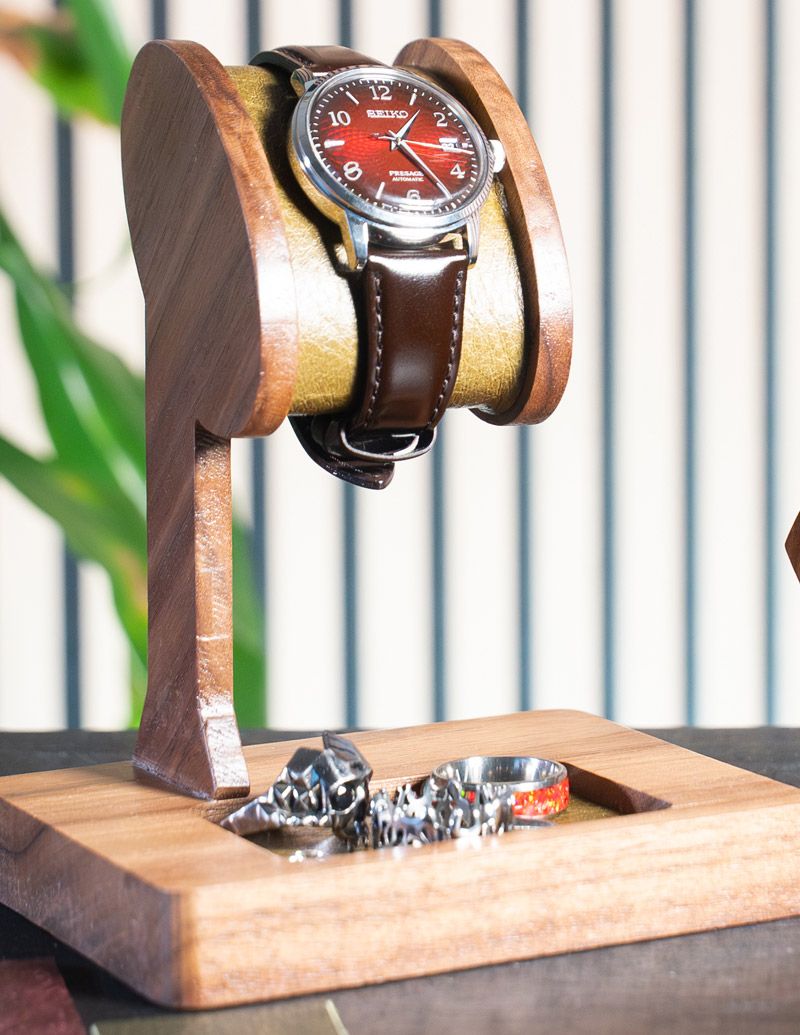
Everyone loves a good watch. A good watch can be timeless and elegant. Whether it was the first watch you purchased or one that has been passed down through the generations, every watch needs a solid resting place when not being worn proudly. That’s where this months luxury watch holder project comes in.
Nav is a big fan of watches himself and wanted to create a project that showcases his love for time pieces but with added practicality. To do that he made a watch holder which displays the watch at an angle, with a useful catch all tray right underneath to house any other worn items, such as rings, earrings or maybe you need a nice resting place for your car keys.
The project itself utilises the clip art that comes with the full license of VCarve Pro and Aspire to create the watch holder segment itself, so you don’t even need your own model. Nav will walk through how he created the vectors for the body of the holder, and crucially how to setup vectors for the dragknife toolpath that was used to cut the leather for the watch holder and catch all tray.
Nav has also included a series of test parts to get you up and running with the drag knife. This way you can make some test cuts before committing to the final project dragknife toolpathing, so you’re confident you’ll make the smooth cuts you need.
So, no time like the present. Let’s get making.
IMPORTANT NOTE:
The pocket toolpath for the side panels has a slight allowance to cut slightly larger than the panel. This in turn allows for the profile toolpath titled ‘Side Panels Cut Out WITH 0.5 START DEPTH’ to start cutting at a depth of 0/5”. So be sure to either amend the toolpath if you want to start from the top of the material or make a note to understand the toolpath will start at 0.5” deep.
Also, this project sets Z-zero from the machine bed, so keep this in mind when setting Z-zero on the machine.


Suitable for version 12 or greater
Login to V&Co to download the files
LoginPlease access this page on a desktop computer to download the files

Vectric Ltd
Precision House
2 Arden Road
Alcester
B49 6HN
Registered in England Number 05382596
VAT Registration GB115123072
Privacy Policy |
Cookie Policy |
Terms and Conditions



