
Add advanced machining strategies for high-output CNC production
Streamline the workflow from cabinet design to machined parts with tools built for drill banks, cutter compensation and production cabinetry.
Advanced Machining Module
The Advanced Machining Module extends Aspire, VCarve Pro, and Cut2D Pro V12+ with tools designed for production cabinetry and nested-based manufacturing on large flat-bed CNC routers. It focuses on streamlining the path from cabinet design software to machined parts, while adding shop-floor flexibility for fit, tooling and drilling operations.
Built for experienced CNC users and production environments, the module reduces setup time, improves consistency across jobs and supports machines equipped with drill banks and controller-level cutter compensation.

Cabinetry Software Compatibility
The following cabinetry software packages are currently supported:
- CabinetParts Pro
- CabinetSense
- KCD
- Mozaik
- Other systems via Custom Mapping Files
Advanced Machine Module Compatibility
Search for your CNC machine to check Advanced Machining Module feature support.

Cabinet Import & Automated Nesting
Cabinet Import & Automated Nesting
Cabinet Import & Automated Nesting
Cabinet Import & Automated Nesting
The Cabinet Import & Automated Nesting feature allows cabinet parts exported from third-party cabinetry software to be brought directly into Aspire, VCarve Pro, or Cut2D Pro, automatically nested, and prepared for machining using a predefined template. Import, nesting, and toolpath creation are handled as a single workflow, ensuring parts are laid out consistently and are immediately ready for production.
Nesting behaviour is driven by a user-defined template file, allowing shops to control sheet usage, spacing, and machining strategy without manual intervention. Toolpaths are automatically created using toolpaths within the template that support automatic vector selection, ensuring each part is machined correctly as soon as it is imported. For cabinet systems not directly supported, a Custom Mapping File can be used to define how imported data is interpreted, providing flexibility across different design platforms.
Direct import from popular cabinetry software
Cabinet parts can be imported directly from supported cabinet design systems, eliminating manual rework and re-drawing.
Template-driven automatic nesting
Parts are automatically nested onto sheets based on settings in the template file, ensuring consistent layouts across jobs.
Automatic toolpath creation
Toolpaths are applied automatically using template-based toolpaths with automatic vector selection, reducing setup time and manual errors.
Consistent, repeatable production output
Reusing the same templates helps maintain machining consistency across jobs, operators, and batches.
Custom Mapping File support
Custom mappings allow integration with additional cabinet software by defining how imported geometry and data are interpreted.
Integrated part labelling
Labels can be generated for each part during import, supporting clear identification throughout production and assembly.
Barcode, QR code, and Data Matrix support
Labels can include machine-readable codes to encode part information for scanning and tracking.
Seven standard label sizes
Labels can be printed using one of seven standard sizes, allowing compatibility with common label printers and shop workflows.
Supported cabinetry software includes:
- CabinetParts Pro
- CabinetSense
- KCD
- Mozaik
- Other systems via Custom Mapping Files

Cutter Compensation For Profile Toolpaths
Cutter Compensation For Profile Toolpaths
Cutter Compensation For Profile Toolpaths
Cutter Compensation For Profile Toolpaths
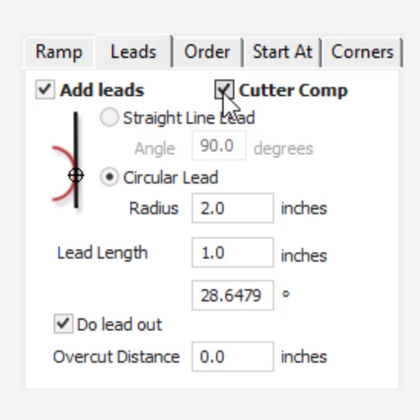
Cutter compensation allows profile toolpaths to be adjusted at the machine controller to account for tool diameter, wear, or fine-tuning of part fit. When enabled and supported by the post-processor, the Advanced Machining Module inserts the correct left or right compensation moves into the output file, allowing controller-level compensation to be used safely and predictably.
This provides production shops with greater flexibility on the shop floor, enabling small adjustments without the need to regenerate toolpaths or modify the original design.
Controller-level cutter compensation
Profile toolpaths can be adjusted at the machine to account for tool size variations or wear.
Left and right compensation support
The correct compensation moves are automatically inserted based on toolpath settings and post-processor configuration.
Improved control over part fit
Fine adjustments can be made to achieve accurate fits without re-tooling or re-calculating toolpaths.
Reduced downtime from tool wear
Compensation allows worn tools to remain in use longer while maintaining dimensional accuracy.
Drill Bank Toolpaths
Drill Bank Toolpaths
Drill Bank Toolpaths
Drill Bank Toolpaths
The Drill Bank Toolpath is designed for flat-bed CNC machines equipped with drill banks and supported by the appropriate post-processor. Instead of treating drilling operations as individual tool changes, this dedicated toolpath uses the physical drill layout of the machine to generate efficient and reliable drilling operations.
This approach is particularly well suited to cabinetry workflows, where repeated hole patterns are common and consistency is critical.
Dedicated drill bank machining
Drilling operations are generated specifically for machines with drill banks, rather than standard single-tool drilling.
Post-processor-driven machine support
Supported machines are determined by the post-processor, ensuring compatibility with the machine’s physical drill layout.
Ideal for cabinet construction drilling
Common use cases include shelf pin holes and drilling patterns for standard cabinet fixings.
Consistent and repeatable hole patterns
Drill bank toolpaths ensure accurate alignment and repeatability across all cabinet parts.


Who is this module for?
The Advanced Machining Module is designed for CNC users working in cabinetry and panel-based production environments. It is particularly well suited to:
- Production shops using flat-bed CNC routers
- Users working with third-party cabinet design software
- Shops running nested-based manufacturing workflows
- Machines equipped with drill banks
- Operators who need repeatable output with minimal setup time
Typical Production Workflow
A common cabinetry workflow using the Advanced Machining Module follows a streamlined, production-focused process.
This workflow is designed to reduce setup time, minimise manual intervention, and support reliable, repeatable cabinetry production on flat-bed CNC routers.

1. Design cabinets in third-party software
Cabinets are designed and exported from supported cabinetry software, ready for manufacturing.

2. Import and prepare parts
The exported cabinet file is imported into the software, where parts are automatically nested onto sheets using a predefined template.

3. Apply machining strategies automatically
Toolpaths are created automatically based on template-defined toolpaths with automatic vector selection, ensuring each part is machined consistently.

4. Fine-tune the fit of parts at the machine
Cutter compensation can be enabled on profile toolpaths, allowing small adjustments for tool wear or part fit directly at the controller.

5. Drill cabinet-specific hole patterns efficiently
Drill Bank Toolpaths are used to machine common cabinetry drilling patterns, such as shelf pin holes and fixing locations, using the machine’s drill bank.

6. Run consistent, repeatable production jobs
By reusing the same templates and workflows, production output remains consistent across jobs and operators.
Advanced Machining Module Free Trial
Follow the simple steps below to try our Advanced Machining Module for free.

Install a free trial version of one of our core products
Download and install a free trial version of Cut2D Pro, VCarve Pro or Aspire.

Select the trial Advanced Machining Module
Install your selected trial software, open, and select "Help > Trial – Advanced Machining Module" from the top menu. Then follow the on-screen instructions to complete the install of the module.

Get started with our video tutorials
Learn all you need to know with our easy to follow Advanced Machining Module tutorials which include sample files to get you started!



